


Introduction: How Smarter Odoo Users Management Drives Efficiency
Efficient management of Odoo users can truly transform the way your business operates. In every organization, whether small or enterprise-scale, assigning the right access and permissions is critical for maintaining security and productivity. When configured correctly, Odoo users enable seamless collaboration between departments, enhance data accuracy, and reduce redundant manual tasks.
Moreover, since Odoo functions as an integrated ERP platform, managing user roles wisely ensures that only the right people handle the right data. This balance helps you control licensing costs while maintaining strong governance and accountability.
In today’s digital ecosystem—where many businesses adopt software development and digital transformation solutions to automate workflows—Odoo’s role-based user management stands out as an essential foundation for growth. With thoughtful configuration, Odoo users can empower every department to perform efficiently, securely, and collaboratively.
Understanding Odoo Users: The Foundation of Secure ERP Access
In any ERP ecosystem, Odoo users act as the foundation that connects people, processes, and technology. Every user represents an individual or role that interacts with your ERP modules, ensuring data flows seamlessly across departments. Therefore, understanding how Odoo users work—and how to manage their permissions—is essential for achieving both security and operational efficiency.
Properly configured Odoo users not only help streamline workflows but also protect your business from costly data errors or breaches. Many organizations overlook the importance of access control, yet in Odoo, user management is strategic, not just technical. It defines who can view, modify, or approve information across the system.
By thoughtfully structuring your Odoo users and their permissions, you build a reliable, secure, and transparent environment where data is always in the right hands.
What Exactly Are Odoo Users?
An Odoo user is any individual who has a login account within your Odoo ERP system. These users are assigned roles and permissions that define their capabilities—whether managing sales, approving HR requests, or updating financial entries. Odoo provides flexibility by allowing administrators to tailor access for each user based on their specific job responsibilities.
Each Odoo user interacts with the system differently. For example, a salesperson might manage leads, while an accountant focuses on invoices and financial reports. Through proper configuration, organizations can maintain productivity while keeping sensitive data secure.
This modular, role-driven structure allows Odoo users to collaborate effectively, ensuring that the system scales naturally as your business grows.
Why Odoo Users Strategy Matters More Than You Think
Managing Odoo users strategically isn’t just an administrative task—it’s a business enabler. When permissions are assigned intelligently, employees perform their duties faster and with fewer errors. Conversely, giving unrestricted access can lead to data inconsistencies, compliance issues, and even financial loss.
A structured Odoo user strategy helps control licensing costs and enforces accountability. For instance, creating specific roles for HR or Finance ensures that only authorized personnel view confidential data such as payroll or budgets. Furthermore, aligning user configuration with your overall ERP strategy ensures better data integrity and efficiency.
By maintaining clear boundaries and reviewing access regularly, you ensure that every Odoo user contributes to security, accuracy, and operational success—all crucial pillars of a well-implemented ERP system.
Exploring the Different Types of Odoo Users (and How They Work)
Every organization operates with unique roles and workflows, which is why Odoo users are categorized into different types. Each user type comes with specific permissions, access levels, and responsibilities designed to align with business needs. This flexibility allows companies to scale efficiently while maintaining security and control.
Understanding these Odoo user types helps you assign access strategically, preventing overexposure of data while enabling employees, contractors, and clients to work productively. Let’s explore each category in detail.
Internal Odoo Users – The Operational Backbone
Internal users are the heart of Odoo’s ERP system. They are employees with full backend access who manage daily business operations across multiple modules.
Typical Responsibilities:
- Managing Sales, Inventory, and Accounting
- Creating and editing records
- Overseeing reports and dashboards
- Configuring workflows and automation
These Odoo users are usually sales managers, accountants, or warehouse operators, ensuring smooth operational execution. Because they possess the most privileges, their roles must be carefully monitored to avoid accidental data changes or security issues.
HRMS Suite Odoo Users – Focused on People and Payroll
HRMS Suite users primarily work within Odoo’s Human Resource Management modules. They handle employee-specific processes, helping automate HR functions while maintaining control over sensitive data.
Key Modules Accessible:
- Employee Directory for managing profiles
- Timesheets for work tracking
- Leaves and Attendances for absence management
- Payroll and Expenses for salary or reimbursement entries
These users are ideal for HR departments aiming to improve workflow accuracy, reduce manual paperwork, and streamline internal processes without giving complete ERP access.
Lite Odoo Users – Minimal Access, Maximum Efficiency
Lite users are designed for individuals who require limited system interaction—such as freelancers, part-timers, or external contractors. They’re a cost-effective way to extend collaboration while maintaining security.
Typical Access Rights:
- Limited visibility into certain records
- Ability to submit timesheets or expenses
- Restricted interaction with backend features
Their permissions can be customized to allow participation without exposing sensitive business data. Lite users help businesses stay agile, especially in project-based environments where external contributors are common.
Portal Odoo Users – Clients and Partners Inside the ERP Loop
Portal users bridge the gap between your business and external stakeholders. They access specific information—such as invoices, project updates, or quotations—through Odoo’s web portal.
Portal Access Benefits:
- Improves transparency with customers and suppliers
- Enables real-time tracking of orders or invoices
- Reduces dependency on manual communication
Portal users enhance client satisfaction while maintaining controlled access boundaries, ensuring business data stays protected.
Public Odoo Users – Visitors with Limited Interaction
Public users are the most restricted category of Odoo users. They’re typically anonymous website visitors who can browse public pages, access forms, or read blog posts without logging in.
Common Use Cases:
- Viewing publicly available content
- Submitting contact or inquiry forms
- Reading company news or product updates
While they lack backend access, public users are important for marketing visibility and customer engagement, forming the first layer of digital interaction with your ERP ecosystem.
| Feature / Access | Internal Users | HRMS Suite Users | Lite Users | Portal Users | Public Users |
| Access Level | Full backend access | HR modules only | Limited backend or front-end | Portal-based interface | Public website only |
| Ideal For | Employees managing daily ops | HR staff & employees | Freelancers, contractors | Customers, suppliers | Anonymous visitors |
| Modules Accessible | Sales, Inventory, Accounting, CRM | HR, Payroll, Attendance | Limited modules (e.g., Timesheet) | Customer-facing (Invoices, Projects) | Website pages & forms |
| Data Access | Create, edit, delete records | View & update HR data | Submit limited data | View assigned data only | View public data only |
| Cost / Licensing | Full license | Discounted | Often free or minimal | Usually free | Free |
| Backend Access | ✅ Yes | ⚙️ Partial | ⚙️ Limited | ❌ No | ❌ No |
| Primary Use Case | Core team operations | HR processes | Temporary or part-time collaboration | Partner or client interaction | Public engagement |
By recognizing the distinctions between these user types—Internal, HRMS Suite, Lite, Portal, and Public—you can assign roles wisely, safeguard critical data, and optimize system performance.
The next step is understanding how to allocate permissions and roles effectively to maintain balance between security and flexibility in your Odoo setup.
Assigning the Right Roles and Permissions for Odoo Users: Smart Allocation
Setting up roles and permissions correctly is the backbone of efficient ERP governance. When businesses manage Odoo users thoughtfully, they ensure that every individual has just enough access to perform their duties—nothing more, nothing less. This approach not only strengthens data security but also improves accountability and workflow efficiency.
Because Odoo supports modular access, administrators can define permissions at multiple levels—modules, menus, and even records. Therefore, assigning roles strategically helps you avoid confusion, minimize risk, and maintain clarity in every operation.
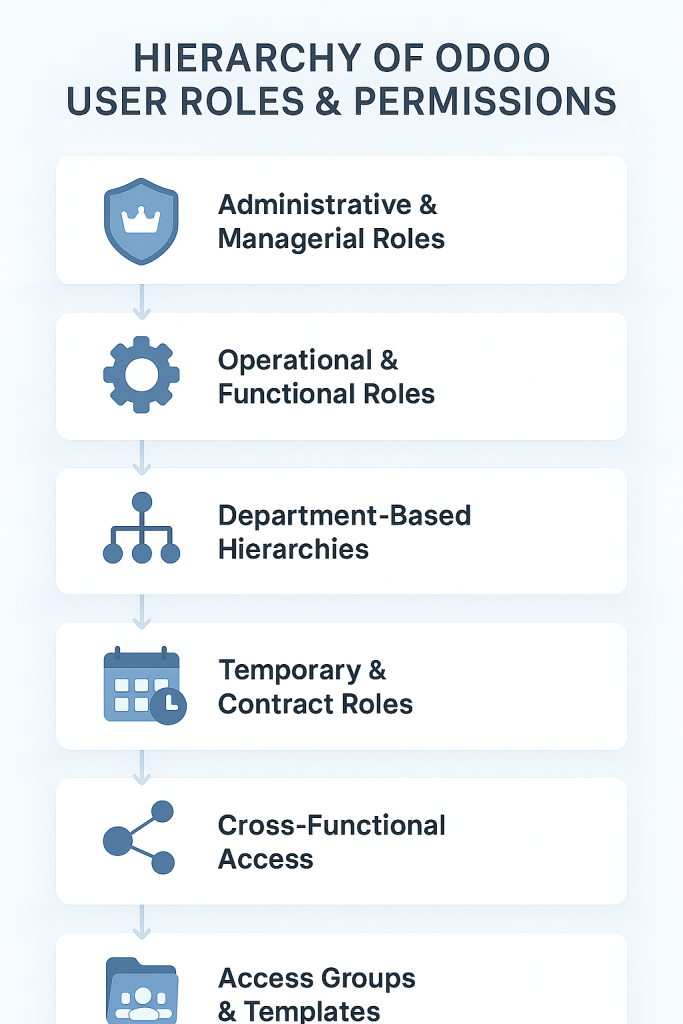
Administrative & Managerial Roles – The Governance Pillars
Administrators and managers serve as the gatekeepers of the Odoo environment. They control configurations, approve major workflow changes, and manage user setups across departments.
Key Responsibilities:
- Overseeing user creation and configuration
- Managing company-wide settings and security
- Approving module installations or updates
- Conducting periodic access audits
Because of their elevated rights, these Odoo users should be few in number and highly trusted. Restricting administrative access minimizes the chance of accidental or unauthorized system changes.
Operational & Functional Roles – Driving Everyday Efficiency
These are the Odoo users who perform the bulk of daily activities. They’re your sales executives, accountants, HR specialists, or inventory clerks—each operating within their defined scope.
Their role is to:
- Handle module-specific tasks such as record creation, updates, and approvals
- Collaborate within teams while maintaining data integrity
- Execute daily workflows smoothly with minimal supervision
Assigning clear operational roles ensures that employees remain focused on their responsibilities while avoiding conflicts between departments.
Department-Based Hierarchies – Layered Access Control
Odoo’s flexible structure allows you to build hierarchies that reflect your organization’s real-world reporting lines. For instance, managers can access team-level reports, while executives see organization-wide analytics.
Best Practices:
- Define hierarchical permissions for each department
- Align reporting visibility with managerial levels
- Keep sensitive data (like finance or payroll) limited to higher tiers
This layered structure prevents data overlap and enhances clarity in accountability.
Temporary & Contract Roles – Time-Bound Access
Temporary roles are ideal for freelancers, contractors, or seasonal staff who need system access for a specific duration. Instead of giving them full internal rights, configure time-limited accounts that expire automatically.
Advantages:
- Enhances data protection for short-term projects
- Reduces risk of post-contract access misuse
- Keeps license utilization cost-efficient
By implementing time-bound permissions, you maintain flexibility without sacrificing security.
Cross-Functional Access – Balancing Flexibility with Security
Sometimes, an employee needs to access multiple departments—say, a finance controller who also manages HR data. In such cases, use carefully blended access roles.
Key Tips:
- Combine permissions selectively, not broadly
- Apply record rules to restrict data visibility
- Review cross-functional users more often during audits
This ensures collaboration between departments while maintaining strict data segregation.
Access Groups & Role Templates – Simplifying Permission Management
Odoo’s Access Groups feature allows admins to bundle permissions into reusable templates. Instead of assigning rights individually, you can apply a pre-built profile such as Sales Manager or HR Officer.
Benefits:
- Saves time during onboarding
- Ensures consistency across users
- Simplifies audit reviews and role changes
Adopting Access Groups keeps your ERP structured and makes managing large numbers of Odoo users much easier.
By combining strategic role allocation, layered permissions, and smart group templates, you’ll maintain a well-organized Odoo environment where every user has the right access—no more, no less.
Best Practices to Manage Odoo Users with Confidence
Managing Odoo users effectively goes beyond simple account setup—it’s about maintaining security, efficiency, and accountability across your ERP system. When done right, user management ensures every action is tracked, every permission is intentional, and every user contributes productively.
To achieve that, organizations should follow certain best practices that keep the system lean, compliant, and transparent. These strategies not only prevent security breaches but also optimize performance and reduce unnecessary licensing costs.
Adopt the Principle of Least Privilege
The principle of least privilege is simple but powerful: grant each Odoo user only the permissions they need to perform their duties—nothing extra.
Why it matters:
- Reduces the risk of data leaks or errors
- Prevents accidental changes in critical configurations
- Keeps sensitive information safe and access controlled
By following this approach, businesses maintain a tight security posture while enabling users to focus on their core responsibilities.
Schedule Regular Access Audits
Even the best configurations become outdated over time. That’s why conducting regular user access audits is crucial. These reviews help identify inactive users, outdated permissions, or redundant access groups.
During an audit:
- Verify if roles still match current job functions
- Revoke access for former or inactive employees
- Review administrator-level accounts for necessity
Routine audits not only improve system performance but also enhance compliance and reduce the risk of data exposure.
Leverage Groups and Roles for Uniform Control
Instead of managing permissions for each user individually, use Access Groups and role templates. This approach keeps your system organized, consistent, and scalable—especially when new team members join.
Benefits include:
- Simplified onboarding and training
- Consistent permission policies across teams
- Easier bulk updates during audits or restructures
By grouping Odoo users strategically, you maintain a clear permission hierarchy, prevent misconfigurations, and ensure smoother ERP operation across departments.
When organizations apply these best practices, they not only strengthen ERP governance but also create a culture of accountability and data integrity. In the long run, this approach saves time, money, and countless hours of troubleshooting caused by poor access management.
How to Add and Configure Odoo Users the Right Way (Step-by-Step)
Creating and configuring Odoo users properly ensures smooth operations, secure data handling, and scalable ERP performance. Whether you’re onboarding new employees or granting access to external collaborators, a systematic setup process minimizes risks and saves time.
Below is a clear, step-by-step guide to help you create, configure, and maintain Odoo users effectively.
Creating a New Odoo User Profile
Before adding a new user, enable developer mode in Odoo. Then, navigate to:
Settings → Users & Companies → Users → Create.
Key steps:
- Enter the user’s name and email address.
- Assign them to the appropriate company (for multi-company setups).
- Specify whether they are internal, portal, or public users.
Once created, Odoo automatically sends an invitation email to activate their account. This method keeps onboarding simple, fast, and trackable.
Assigning Access Rights and Module Permissions
The next step is to configure Access Rights and User Roles. Every Odoo user should only have access to modules necessary for their work.
Example:
- Salesperson → Sales, CRM, and Invoicing modules.
- Accountant → Accounting, Expenses, and Reporting modules.
- HR Officer → Employees, Leaves, and Payroll modules.
Tip: Start with minimal permissions and expand gradually if more access is needed. This avoids unnecessary exposure and maintains control.
Configuring Multi-Company Access Safely
If your business operates multiple entities, configure multi-company access with caution.
Each Odoo user can be linked to one or more companies, but you should:
- Clearly define which companies the user can access.
- Ensure data isolation between company records.
- Enable record rules to prevent accidental cross-company updates.
Proper multi-company configuration keeps financial and operational data secure while enabling authorized collaboration.
Role Templates for Fast & Consistent Setup
Instead of building every user profile from scratch, use role templates. Templates help maintain consistent access structures across departments.
Advantages:
- Simplifies onboarding for new employees.
- Prevents configuration errors.
- Ensures uniform role-based permissions throughout the system.
By standardizing permissions, you’ll ensure that every Odoo user follows the same rules—keeping your system organized and compliant.
User Defaults & Preferences Customization
Personalizing each Odoo user’s experience improves productivity. Adjust default settings such as:
- Language and time zone preferences.
- Notification methods (email, chat, or in-app alerts).
- Default company or project view.
These small adjustments make the system more user-friendly and ensure that team members work comfortably within their operational context.
Audit Trails & Change Tracking
Maintaining audit trails is essential for monitoring accountability. Every time a user is added, updated, or removed, Odoo logs the change automatically.
Benefits:
- Helps detect unauthorized access or configuration edits.
- Supports compliance audits and internal reviews.
- Creates transparency across user management processes.
By enabling audit tracking, you gain full visibility into system activities, making it easier to resolve issues and enforce compliance.
When you add and configure Odoo users using this structured approach, you create a secure, scalable, and efficient ERP environment. This not only enhances collaboration but also builds long-term trust in your internal systems.
Common Pitfalls to Avoid with Odoo Users
Even with the best intentions, businesses often make simple yet costly mistakes while managing Odoo users. These oversights can lead to data leaks, inefficient workflows, and unnecessary licensing expenses. However, by recognizing these pitfalls early, you can prevent errors before they disrupt your ERP ecosystem.
Below are the most frequent mistakes organizations make—and how to avoid them.
Over-Permissioning: Giving More Rights Than Needed
One of the most common errors is granting excessive access rights to users. It might seem convenient at first, but it quickly becomes a security and compliance risk.
Why this happens:
- Admins overlook specific role boundaries.
- Teams share credentials for faster access.
- Lack of understanding of permission layers.
How to fix it:
- Apply the principle of least privilege—only grant what’s necessary.
- Regularly review permissions and remove unnecessary access.
- Use Access Groups for consistent control.
When you balance authority and responsibility carefully, you’ll keep data secure and workflows streamlined.
Neglecting Inactive or Former Users
Another major issue arises when companies forget to deactivate or remove users who no longer work with the organization. These accounts often become entry points for unauthorized access or data misuse.
To prevent this:
- Conduct monthly or quarterly user audits.
- Immediately revoke access for employees who leave.
- Assign temporary expiration dates to contractor accounts.
Deactivation should be a routine process in every ERP system—it’s one of the simplest yet most effective ways to strengthen security and maintain compliance.
Ignoring Audit Trails and Activity Logs
Many administrators underestimate the value of Odoo’s audit and logging features. Without consistent tracking, it becomes difficult to trace errors or identify policy violations.
Why it matters:
- Detects unusual activity or failed login attempts.
- Supports internal audits and compliance.
- Encourages user accountability within the ERP environment.
By routinely reviewing audit logs, you can catch issues early, maintain transparency, and build a culture of responsibility across all Odoo users.
Skipping Role Documentation and Standardization
Another often-overlooked mistake is failing to document roles and permissions. Without written standards, new admins or auditors might struggle to understand why certain users have specific access.
To fix this:
- Maintain a role mapping sheet listing each user’s permissions.
- Use naming conventions for roles and access groups.
- Store documentation centrally for easy review.
This ensures every user role is clear, justified, and easy to manage during audits or future reconfigurations.
Avoiding these pitfalls not only protects your data but also enhances system performance and trust among your team. By staying proactive and consistent, you’ll ensure that Odoo users remain a source of productivity—not vulnerability.
Conclusion: Empower Your Teams with Smarter Odoo Users Management
In today’s data-driven world, efficient Odoo users management is more than just a technical task—it’s a strategic advantage. When every role, permission, and access level is thoughtfully assigned, your ERP system becomes a foundation of trust, productivity, and growth.
By applying best practices—like the principle of least privilege, regular access audits, and structured role templates—you strengthen not only system security but also team accountability. Businesses that follow this approach experience fewer errors, lower licensing costs, and greater transparency across all departments.
Moreover, by continuously reviewing user access and maintaining clear documentation, you ensure that your ERP evolves with your organization. As your company scales, so does your ability to manage information efficiently and securely.
Ultimately, empowering your workforce through well-structured Odoo users is the key to unlocking operational excellence. With the right access, the right people, and the right structure—your ERP doesn’t just manage data; it drives transformation.
Frequently Asked Questions (FAQs)
1. What are the main types of Odoo users?
There are five primary types of Odoo users: Internal, HRMS Suite, Lite, Portal, and Public users.
Each category serves a unique purpose—internal users manage backend operations, HRMS users handle employee processes, lite users have limited module access, portal users interact through the customer interface, and public users browse open website content.
2. How do Odoo users affect licensing costs?
Licensing in Odoo is directly tied to user types. Internal users require full licenses, while HRMS Suite and Lite users often have lower or even minimal costs. By correctly categorizing each account, you can save significantly on licensing expenses while keeping your ERP functional and secure.
4. What’s the best way to monitor Odoo user activity?
Use Odoo’s built-in audit logs and activity tracking features to monitor logins, edits, and configuration changes. Regular reviews of these logs help you detect unusual behavior, prevent misuse, and maintain compliance with internal policies.
5. How can I simplify role assignment for multiple Odoo users?
Instead of configuring each account manually, use Access Groups and role templates. These features let administrators manage permissions collectively, ensuring consistency and reducing human error—especially in large teams.